

Responsibility board
Flowboard
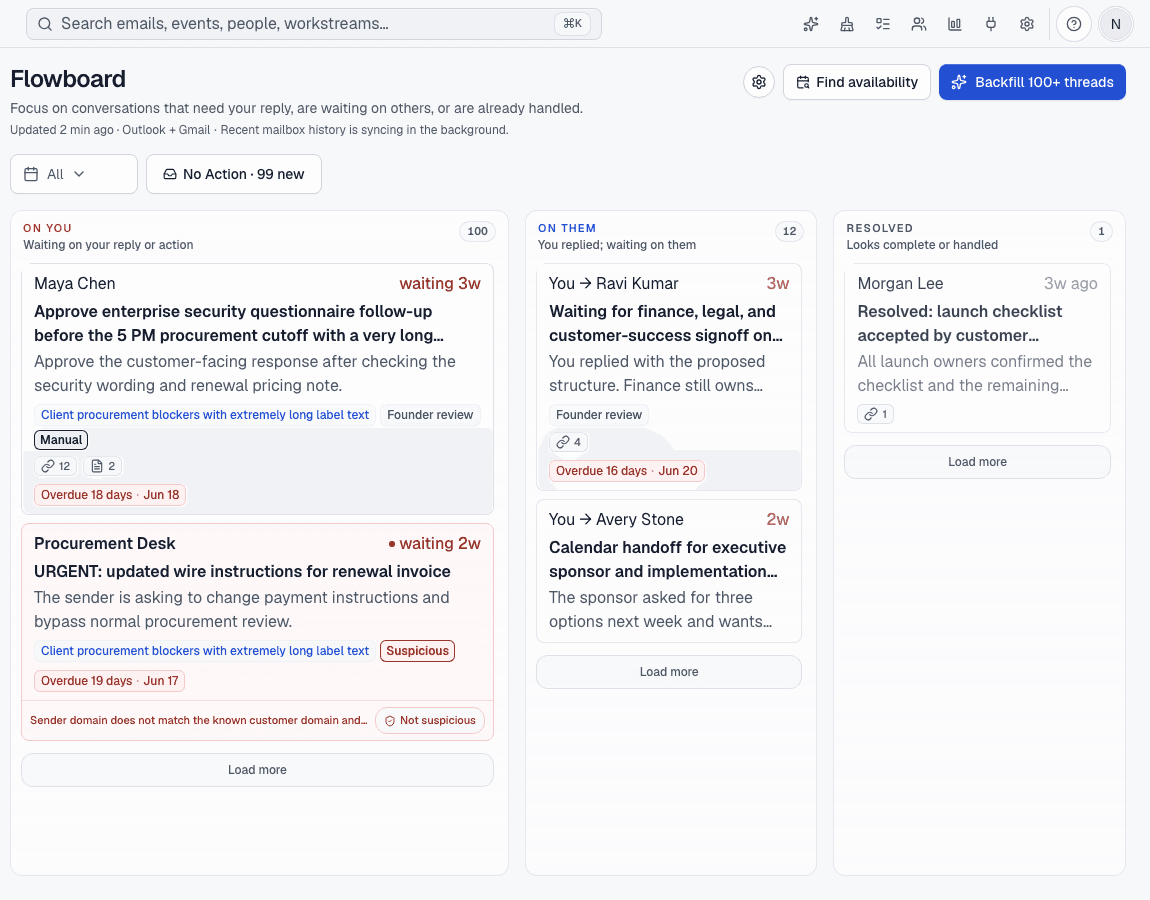
See which conversations need your move, which are waiting on someone else, and which can leave your attention.
How it works
1
Connect mail
Avalon works with Gmail, Google Workspace, Outlook, and Microsoft 365 accounts.
2
Sort by ownership
Threads land in On You, On Them, Resolved, or No Action so the board matches the next move.
3
Act from context
Open the message, add a note, set a due date, ask Avalon AI, or move the thread when ownership changes.
Before Avalon
A full inbox makes every thread look equally urgent, even when most messages are waiting, already done, or informational.
After Avalon
Avalon groups conversations by responsibility, keeps the source message one click away, and lets AI help prepare the next safe move.
What Avalon supports
- Responsibility states for On You, On Them, Resolved, and No Action
- Manual notes and due-date context on Flowboard items
- Links back to the underlying mailbox conversation
- AI summaries and draft help where enabled
Important boundaries
- Newsletter, marketing, calendar, and cleanup classes are not Flowboard labels.
- Avalon keeps your provider mailbox as the source of record.
Related features
See Avalon with your real mailbox
Start with a connected account, keep important actions reviewable, and decide which AI and automation surfaces belong in your setup.