

Meetings
Calendar and meeting prep
Find open time, review the day, and prepare for meetings with relevant threads pulled into view.
How it works
1
Read the calendar
Connect Google or Microsoft calendar access for the meeting features you enable.
2
Find time
Search for open slots with duration, date, and buffer controls when availability data is available.
3
Prepare the room
Use meeting briefs to collect relevant email context before the conversation starts.
Before Avalon
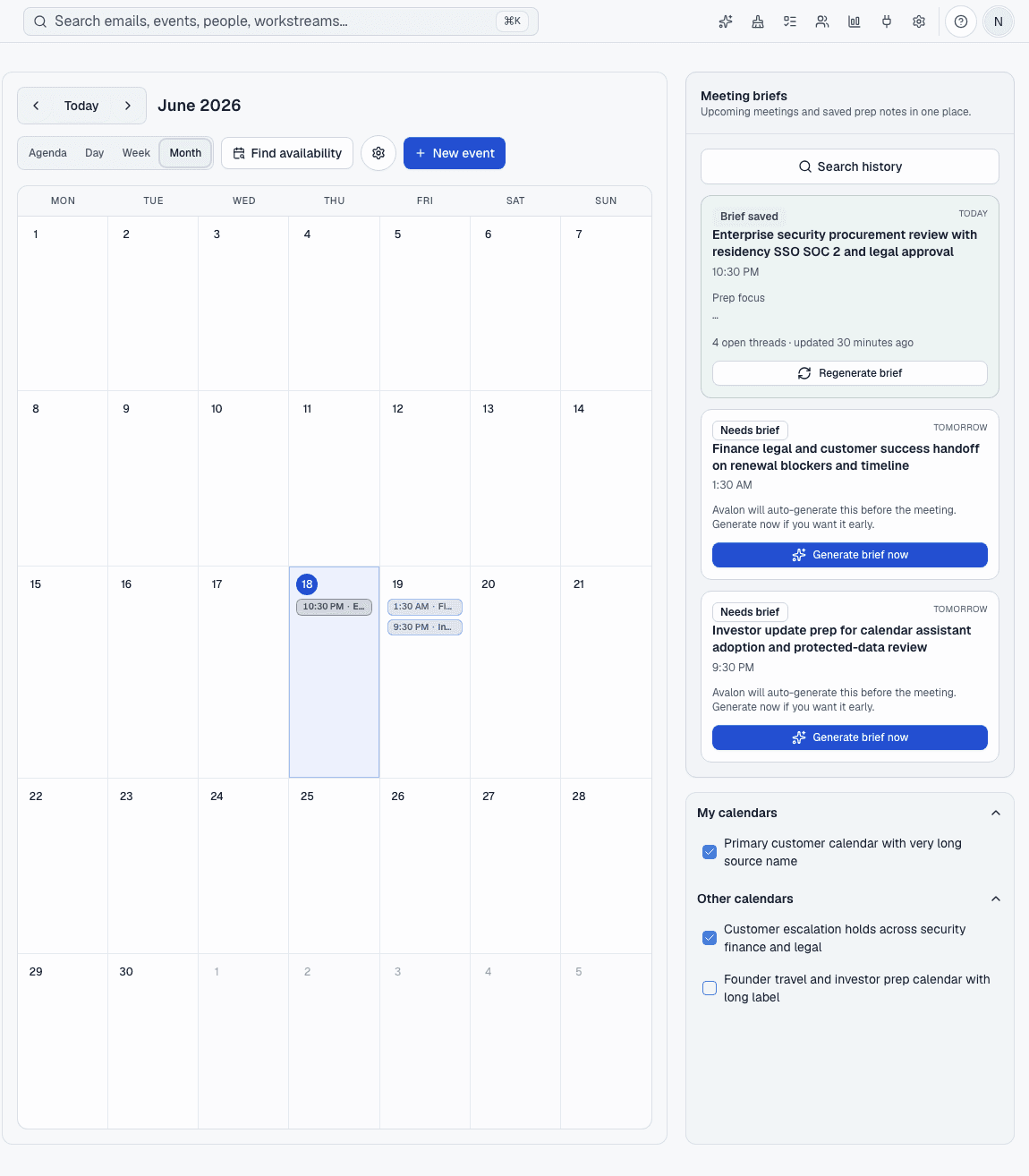
Scheduling and meeting prep live in a separate calendar tab, while the useful context stays buried in email.
After Avalon
Avalon keeps calendar views, availability search, and meeting briefs close to the mailbox conversations that explain the meeting.
What Avalon supports
- Agenda, day, week, and month calendar views
- Availability search for connected calendars
- Meeting briefs saved for later reference
- Recipient and recent-message context where access allows
Important boundaries
- Avalon does not promise every meeting will have a brief.
- Availability depends on connected provider data and permissions.
Related features
See Avalon with your real mailbox
Start with a connected account, keep important actions reviewable, and decide which AI and automation surfaces belong in your setup.