
Contacts
People context
Search people by name, email, company, or title, then jump back to the mail and calendar context around them.
How it works
1
Find the person
Search recent correspondents and connected contacts by name, email, company, or title.
2
Check recent context
See recent conversations, last-contact direction, and available profile details.
3
Keep private notes
Save favorites, mailbox-private notes, and corrections without changing provider records.
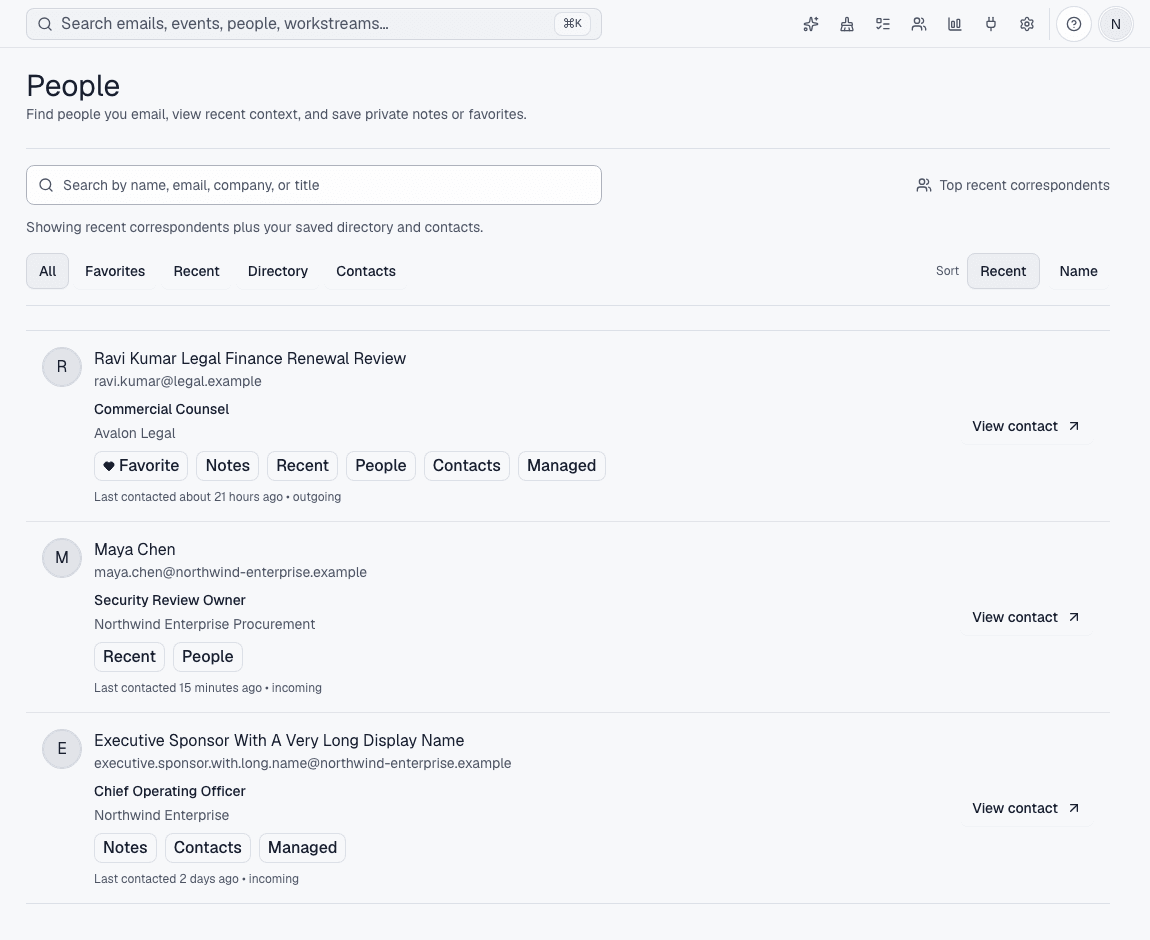
Before Avalon
You remember the person, but not which account, thread, or meeting has the useful context.
After Avalon
Avalon combines recent correspondents with connected contacts and mailbox-private notes so the relationship context is close to the work.
What Avalon supports
- Recent correspondent and connected-contact search
- Conversation and last-contact context
- Profile corrections, favorites, and private notes
- Jumps back to matching mail or calendar context
Important boundaries
- Avalon is not a CRM and does not promise shared team memory here.
- Provider directory coverage differs by account and permissions.
Related features
See Avalon with your real mailbox
Start with a connected account, keep important actions reviewable, and decide which AI and automation surfaces belong in your setup.